Aircraft file
An aircraft file defines the (undeformed) geometry of an aircraft. Aircraft models are defined using a hierarchical system. An aircraft is made up of one or more wings. Each wing may be divided into segments (a quadrilateral), and each wing may also have control surfaces.
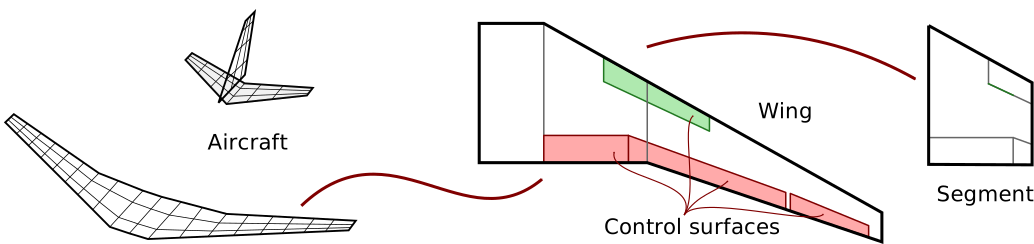
Fig. 3 An aircraft is broken down into wings and a wing is broken down into segments. Each wing can have any number of control surfaces. (Note that segment strips and strip subdivisions are part of PyTornado’s internal API. However, they are not relevant for the model input discussed here.)
Coordinate system
Note that all absolute coordinates in the aircraft file are based to the body-fixed coordinate system.
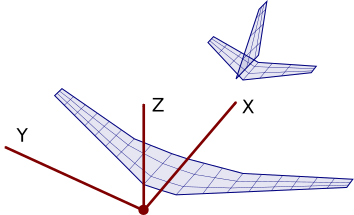
Fig. 4 Body fixed coordinate system
See also
Example file
The aircraft definition file closely resembles the this hierarchical structure discussed above. A fairly simple example is shown below.
Aircraft: uid (unique identifier)
The uid keyword defines the name of the aircraft. You may choose any string here. The name will for instance be shown as titles on plots.
Aircraft: refs (reference values for aerodynamic coefficients)
Aerodynamic coefficients like drag or lift coefficients only have a meaning if the corresponding reference value are known. In PyTornado, reference values have to explicitly defined. There are five reference values in PyTornado:
areaWing surface area in [\(m^2\)]spanWing span in [\(m\)]chordWing mean aerodynamic chord in [\(m\)]gcenterCentre of gravity in form [\(X\), \(Y\), \(Z\)] where \(X\), \(Y\), \(Z\) are coordinates [\(m\)]rcenterCentre of rotation in form [\(X\), \(Y\), \(Z\)] where \(X\), \(Y\), \(Z\) are coordinates [\(m\)]
How these reference values are used is described in section Loads and coefficients.
Aircraft: wings (wing object)
The wings keyword is followed by a list (square bracket). Each list entry must be a description of a separate wing. The wings list must contain at least one wing.
Structure of the wing list
"wings": [
    {
        << description of wing object 1 >>
    },
    {
        << description of wing object 2 >>
    }
]
Wing: uid (unique identifier)
Each wing must have a UID (unique identifier).
Wing: symmetry (symmetry flag)
Aircraft normally have a symmetry plane, i.e. the wing on one side can have a mirror image on the other side. Wings can have symmetry flags. If such a flag is set, the mirror image will be generated and included in the VLM analysis. Symmetries can be defined across the three basic planes in the Cartesian coordinate system.
| Flag | Description |
|---|---|
| 0 | No symmetry |
| 1 | Symmetry across \(X\text{-}Y\) plane |
| 2 | Symmetry across \(X\text{-}Z\) plane |
| 3 | Symmetry across \(Y\text{-}Z\) plane |
In most cases the symmetry flag 2 is used. In a conventional configuration both the main wing and the horizontal tail can/should have this flag. The vertical stabiliser does not have any mirror, hence the symmetry flag is 0.
Wing: segments (symmetry objects)
The segments keyword is followed by a list (square bracket). Each list entry must be a description of a separate wing segment. The segments list must contain at least one segment.
Structure of the segment list
"segments": [
    {
        << description of wing segment object 1 >>
    },
    {
        << description of wing segment object 2 >>
    }
]
Segments: uid (unique identifier)
Each segment must have a UID (unique identifier).
Segments: vertices
Segments can be defined in two ways, either using the vertices field or using the geometry field. The vertex based description is quite straight-forward. Each wing segment is a quadrilateral, i.e. basically a plane in 3D space which is defined by four vertices. The vertices are named \(a\), \(b\), \(c\) and \(d\). Each vertex is a point in 3D space given by the list with the coordinates [\(X\), \(Y\), \(Z\)]. A segment is fully defined as shown in the following example:
"vertices": {
    "a": [0, 0, 0],
    "b": [0, 5, 0],
    "c": [2, 5, 0],
    "d": [2, 0, 0]
}
TODO add illustration
Segments: geometry
TODO add illustration
Segments: airfoils
A segment can have an inner and an outer airfoil. The inner airfoil is located at the segment edge \(a\)-\(d\), and the outer airfoil is located along edge \(b\)-\(c\). In between the inner and outer airfoil the airoil geometry will vary linearly as illustrated with the following animation.
TODO add animation
There are two ways to define airfoils. First, NACA airfoils (4-digit series) can be defined with a string "NACAxxxx" where xxxx are the digits. Second, arbitrary airfoils can be included from separate file. The airfoil file should be located in the airfoils folder of the project directory. An absolute or relative file path to the airfoil file which is to be loaded must be included. Preferably, a relative path is used (relative to the project directory, e.g. "airfoils/file_with_airfoil_coordinates.dat").
Example airfoil definitions
"airfoils": {
    "inner": "NACA2412",
    "outer": "airfoils/file_with_airfoil_coordinates.dat"
},
See also
More information on airfoils can be found here: Airfoil files
TODO add illustration
Segments: panels
The number of panels can be set manually for a specific segment. num_s is the number of spanwise panels and num_c is the number of chordwise panels.
"panels": {
    "num_s": 10,
    "num_c": 5
}
Hint
This is an optional setting. PyTornado will try to find a good number of panels for each segment. The panels setting may be ommitted.
Wing: controls
Besides segments (at least one required), wings can optionally have control surfaces which are defined using the keyword controls. The controls keyword is followed by a list (square bracket). Each list entry must be a description of a separate control surface.
Structure of the contol surface list
"controls": [
    {
        << description of wing control object 1 >>
    },
    {
        << description of wing control object 2 >>
    }
]
Control: uid (unique identifier)
Each control must have a UID (unique identifier).
Control: device_type
Control surfaces can be leading edge devices or trailing edge devices. The keyword device_type must be followed by one of the following two strings:
"flap"Trailing edge device"slat"Leading edge device
TODO add illustration
Control: deflection
Control surface deflection in degrees [\(^\circ\)] on the wing main side.
TODO sign convention
TODO add illustration
Control: deflection_mirror
Control surface deflection in degrees [\(^\circ\)] on the mirrored side. This setting is only applicable if the wing has a mirrored side. Otherwise this setting will be ignored.
Control: segment_uid
Control surfaces may span across multiple wing segments. The keyword segment_uid defines where the inner and the outer edge of the control segment are located. For instance, to let a control surface span from a segment called uid_of_the_INNER_segment to another segment with UID uid_of_the_OUTER_segment, you can write:
"segment_uid": {
    "inner": "uid_of_the_INNER_segment",
    "outer": "uid_of_the_OUTER_segment"
},
Of course, the segment with UID uid_of_the_INNER_segment and the segment with UID uid_of_the_OUTER_segment must exist and they must be located on the same wing.
TODO add illustration
Control: panels
The panels setting for control surfaces is an optional setting which can be used to manually set the number of panels for a specific control surface. Notice that only the number of chordwise panels can be set for a control surface. The number of spanwise panels is determined by the segment on which the control is placed.
"panels": {
    "num_c": 5
}